If you spend hours a day in a chat box, every trip to the mouse costs a little. Not much each time, but a lot across a week. Learning five shortcuts is the cheapest speed-up on offer.
Which ChatGPT keyboard shortcuts are worth knowing?
These are the ones most often listed, on Ctrl for Windows and Linux and Cmd on a Mac. OpenAI changes the interface from time to time and the first three come from third-party lists rather than OpenAI's own docs, so check they still work for you.
- New chat:
Ctrl+Shift+O - Focus the message box:
Shift+Esc - Show or hide the sidebar:
Ctrl+Shift+S - Search chats:
Ctrl+K(Cmd+Kon a Mac)
Of those, new chat and search are the two that pay for themselves. (On a Mac, the Ctrl ones are usually Cmd.) Focusing the message box is handy after you've clicked away from it to read.
What do they leave out?
They cover moving around ChatGPT. They don't cover the things you do around it: reusing a prompt, filing a chat, exporting one, jumping to another AI. And they work on ChatGPT only. Claude, Gemini and Grok have their own, and they aren't the same.
If you use more than one AI, you end up learning several sets of keys for the same small jobs.
What is Recallery's command palette?
Recallery adds one palette that opens with the same shortcut on ChatGPT, Claude, Gemini and Grok: Cmd+Shift+K on a Mac, Ctrl+Shift+K on Windows and Linux. Start typing and pick with the arrow keys and Enter.
- Press the shortcut. The palette opens with a list of commands.
- Type a few letters to narrow it down, then press
Enter.
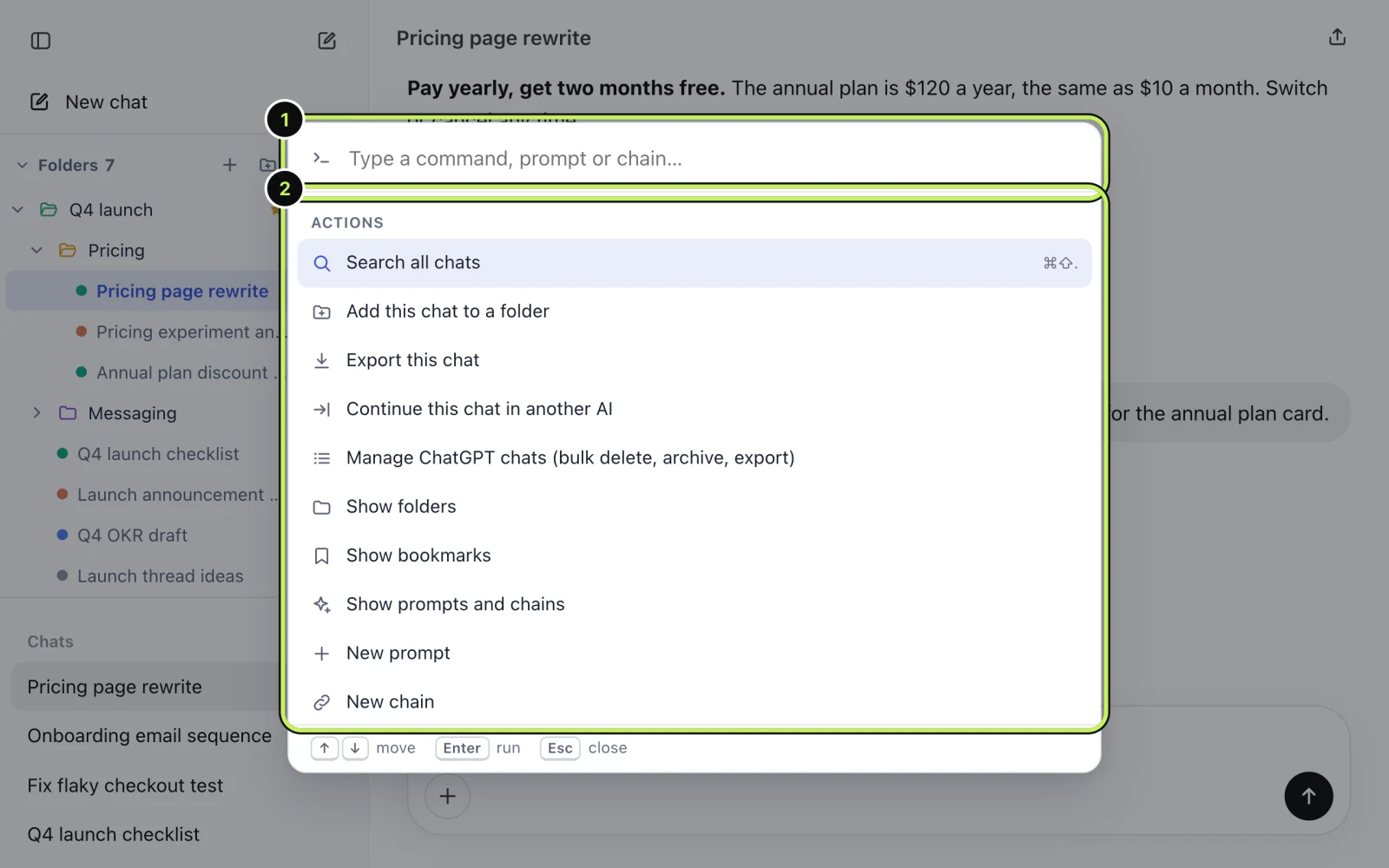
The commands it knows:
- Search all chats
- Add this chat to a folder
- Export this chat
- Continue this chat in another AI
- Manage chats (bulk delete, archive, export)
- Show folders, bookmarks, prompts
- New prompt, New chain
- Open the Recallery dashboard
- Settings
Your saved prompts show up in the palette as well, with an "insert" action, so it works as a prompt picker too. Each command has its own guide: search, export, continuing in another AI, managing chats.
What are the other shortcuts?
There are two more keyboard routes, and neither needs the palette.
Typing triggers. In the message box, // opens your prompts, .. opens your chains and @@ adds context from another chat. They only fire at the start of a word, so normal typing is unaffected. You can change the triggers in settings if one clashes with something you type.
Search. Cmd+Shift+. (Ctrl+Shift+. on Windows and Linux) opens search directly, without going through the palette.
Can you change the shortcuts?
Yes. Settings has a Keyboard shortcuts section listing what each one does, with a "Change shortcuts" button. It takes you to Chrome's own shortcuts page for extensions, where you can set any key combination you like, including one for "Add the current chat to a folder", which has no shortcut by default.
What are the limits?
The palette itself isn't limited. A few of the commands behind it have limits of their own on the free plan, such as the daily allowance for continuing in another AI.
Questions people ask
Does the shortcut clash with anything? If it does on your setup, pick a different combination on Chrome's extension shortcuts page.
Does it work in Gemini and Claude? Yes, the same shortcut opens the same palette on all four sites.
Does the palette send what I type anywhere? No. It runs in your browser and searches your own prompts and chats on your computer.