ChatGPT doesn't have a place to keep the prompts you reuse. Not that we could find, anyway. There is no "my prompts" tab, so most people end up with one of three workarounds: a notes file, a pinned chat, or a long scroll back through old conversations to find the one that worked.
All three work for a while. Then you have forty prompts, three versions of each, and a note called "prompts FINAL 2".
This guide covers what you can do inside ChatGPT today, where it falls short, and a way to keep prompts one keystroke away in ChatGPT, Claude, Gemini and Grok at the same time.
What can ChatGPT do about saved prompts on its own?
Quite a bit, just not a library. As of October 2026 the closest things are:
- Custom instructions. Standing rules that apply to every chat, like "keep answers short" or "I write in British English". Good for how you want ChatGPT to behave. Not good for a prompt you only want sometimes, because it is always on.
- Memory. ChatGPT can remember facts about you across chats. Same story: it is about you, not about a specific task.
- Projects and GPTs. You can give a project its own instructions, or build a custom GPT around one job. This is the right tool when a prompt has become a whole workflow. It is a lot of setup for a prompt you use every Friday.
- Scrolling up. Open an old chat, copy your first message, paste it into a new one. Everyone does this. It is slow and it breaks the day you can't remember which chat it was.
None of these is a mistake. They solve other problems. What's missing is the small thing: type a few characters, pick a prompt, send.
Where do people usually keep their prompts?
A notes app, a text file, a Notion page, a spreadsheet. If you have one that works, keep it. The trouble starts when you use more than one AI. Your Claude prompts live in one place, your ChatGPT ones in another, and the best ones get copied between them and drift apart.
It also costs a context switch every time. You leave the chat, find the note, copy, come back, paste. Do that ten times a day and it adds up to more than you'd guess.
How do you save a prompt with Recallery?
Recallery is a Chrome extension that adds a prompt library right inside the AI site. Everything is stored in your browser. There is no account and nothing is sent to a server. There are two ways to add a prompt.
From a page. Select any text, right-click, and choose "Save selection as a Recallery prompt". This works on any website, so it's the quickest way to keep a prompt you found in a thread or an article.
From scratch. Open the command palette with Cmd+Shift+K (Ctrl+Shift+K on Windows and Linux), type "new prompt", and fill in the form.
- Give it a title you will recognise in a list, like "Weekly status update".
- Paste or write the prompt itself.
- Press Save prompt. "Save and insert" does the same and drops it straight into the message box.
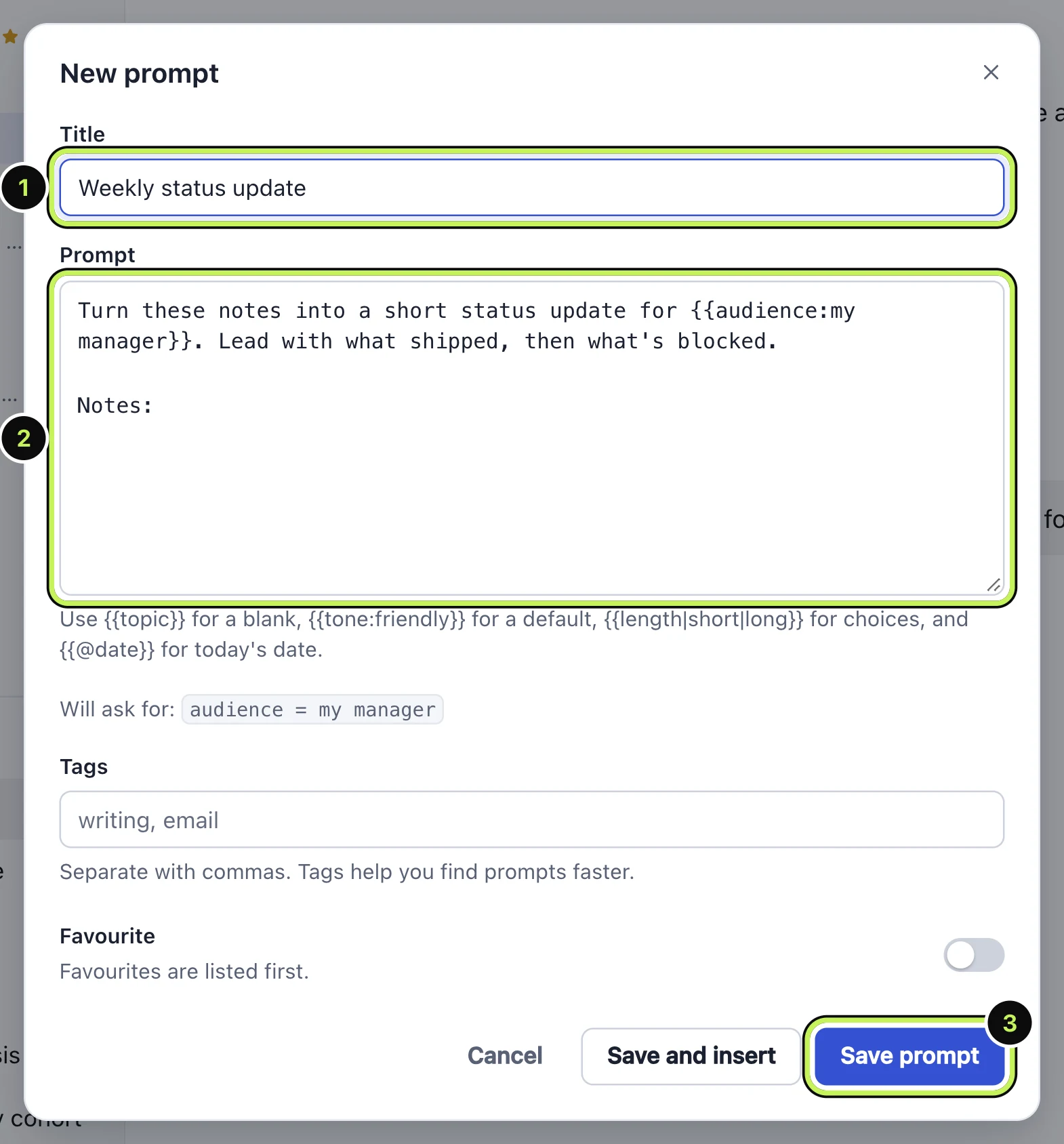
Tags are optional. They help you find prompts faster once the list gets long. If you want blanks in the prompt that you fill in each time, that's covered in the guide to prompt templates and variables.
How do you use a saved prompt?
In any message box on ChatGPT, Claude, Gemini or Grok, type //. A picker opens over the box with your prompts. Keep typing to filter, use the arrow keys to move, and press Enter to insert.
- Type
//at the start of a word in the message box. - Pick a prompt. Type a few letters of the title to narrow the list.
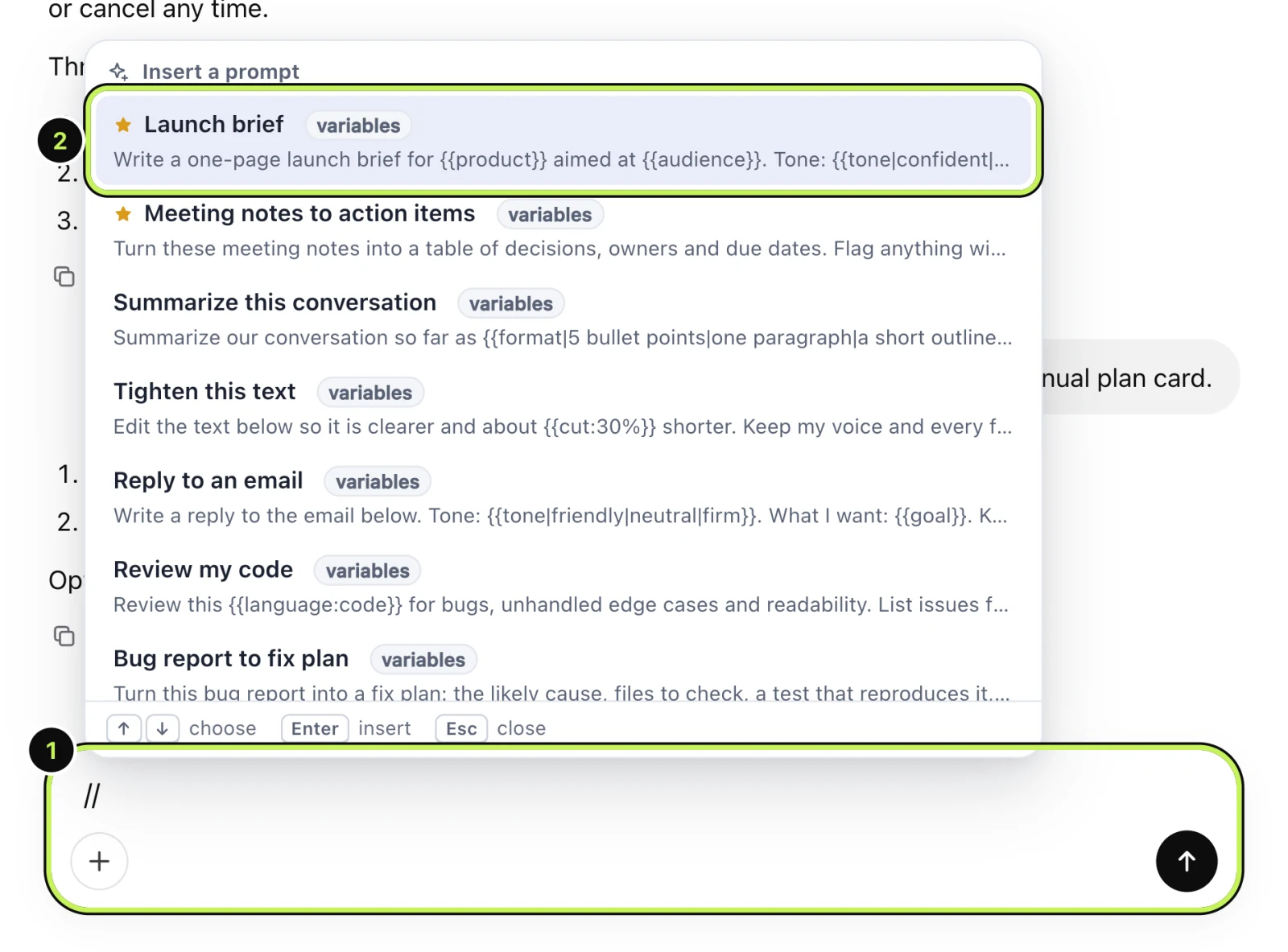
It inserts the text where your cursor is, and if you already typed something it stays. Nothing is sent until you press send yourself, so you can edit the prompt first.
The // trigger can be changed in settings if it clashes with something you type often.
What are the limits on the free plan?
The free plan keeps 5 prompts, which is enough to find out if the habit sticks. Pro removes the limit. We'd rather say that up front than have you hit it halfway through setting up.
There is also a starter library of nine prompts and a three-step chain (research, outline, draft) so the picker isn't empty the first time you open it. Delete what you don't want.
Is it worth setting this up?
If you reuse the same five or six prompts, yes, and you'll feel it within a day. If you only ever write one-off questions, probably not, and a notes file is fine.
A good test: think of the last prompt you wrote twice. If you can't find it in under ten seconds, this is for you.
Questions people ask
Can ChatGPT save prompts for me? Not as a list you can pick from. Custom instructions, memory and Projects cover related needs, but there is no prompt library.
Do saved prompts work on Claude and Gemini too? Yes. The same library appears in ChatGPT, Claude, Gemini and Grok, so one version of each prompt is enough.
Where is my data stored? In your browser, on your computer. You can download a backup from the settings page and restore it in another browser.