Your chat list is a junk drawer. Hundreds of one-off questions, test prompts, a few chats you'd rather nobody saw. You'd like to clear most of it and keep the dozen that matter.
ChatGPT makes this oddly hard, and it pays to know exactly what its options do before you click anything.
How do you delete chats in ChatGPT?
There are two routes, and they sit at opposite ends.
One at a time. Hover a chat in the sidebar, open its ••• menu and choose Delete (or Archive). Fine for three chats. Miserable for three hundred.
All of them. Settings, then Data controls, has Archive all chats and Delete all chats. Both act on everything. Delete is permanent, and you can't undo it.
What's missing is the middle: tick fifty chats and clear those. As far as we can tell, ChatGPT has no multi-select for that.
Two details worth knowing:
- Archiving hides a chat from the sidebar list but doesn't delete it. Archived chats are still searchable.
- Deleting is the one you can't take back, so it deserves the most care.
How do you delete or archive a batch with Recallery?
Recallery adds a Manage chats screen. It lists your chats with checkboxes, so you choose which to act on. Delete works on ChatGPT, Claude, Gemini and Grok; archive is for ChatGPT.
- Open the command palette with
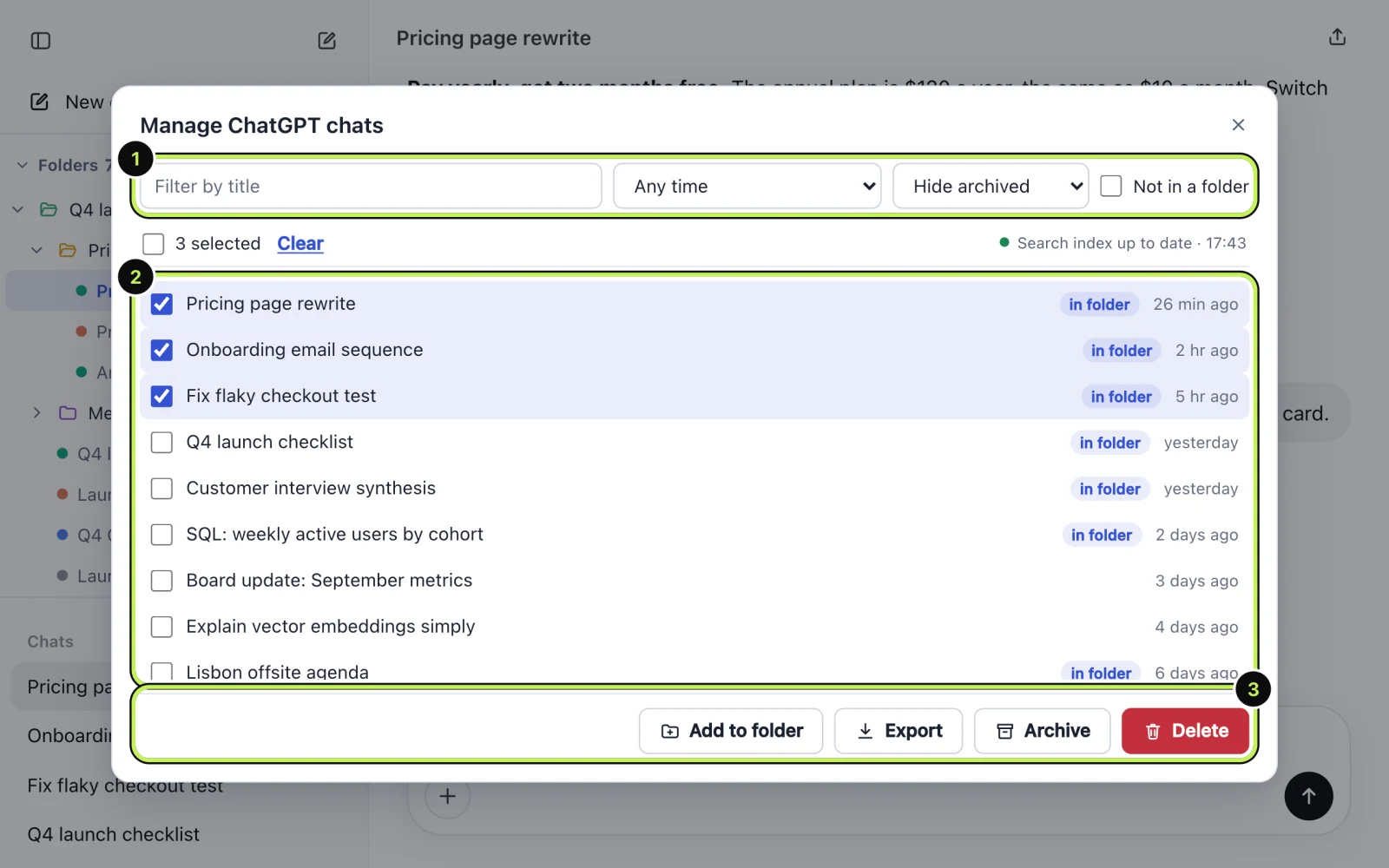
Cmd+Shift+K(Ctrl+Shift+Kon Windows and Linux) and choose Manage chats. The command names the site you're on, such as "Manage ChatGPT chats". - Narrow the list with the filters at the top: a word from the title, a time range, hide archived, or only chats that aren't in a folder.
- Tick the chats you want. A counter shows how many you've picked.
- Use the buttons at the bottom: Add to folder, Export, Archive or Delete.
Before anything is deleted, a confirmation lists the chats (the first eight by title) and says what's about to happen. For a delete it says plainly that Recallery can't undo it. That screen is your last chance to back out.
What's a safe order to clean up in?
A sequence that keeps you out of trouble:
- Export what you might want. Tick those chats and press Export, or see how to export a conversation.
- Move keepers into folders. "Add to folder" is on the same screen. See organizing chats into folders.
- Archive the maybes. Archive hides them but keeps them, and they stay searchable.
- Delete only what you're sure about. Filter by "not in a folder" to see what's left over.
Archiving first and deleting later costs you nothing and means the first pass can't go wrong.
What are the limits?
On the free plan you can act on 5 chats at a time. Pro removes that limit. If you pick more than the free limit, the confirmation screen says so and holds the button until you reduce the selection.
Questions people ask
Can I undo a delete? No. Recallery can't undo it, and ChatGPT may not let you recover the chats either. Archive instead if you're unsure.
Is this the same as deleting in ChatGPT? The chat is deleted on the AI site, as if you'd deleted it there. What the site keeps afterwards is up to the site, so check its data policy if that matters to you.
Will it delete a chat that's in a folder? If you tick it and confirm, yes. The folder entry will then have nothing to open, so remove it from the folder as well.