Open your ChatGPT sidebar. If you've used it for a year, it's one long list of chats, newest on top, and half of them are called "New chat" or something the model made up from your first message. The one you need is in there somewhere.
People ask how to put chats into folders so often that it's worth being clear about what ChatGPT does and doesn't offer.
Does ChatGPT have folders?
Not for ordinary chats, as far as we can tell (this is as of October 2026, and it may change). The nearest thing is Projects. A project groups chats together and lets you give them shared instructions and files. If you start the chat inside a project, it's filed there.
Projects are good when a group of chats shares background, like a client or a course. They are less handy for tidying up everything you do with AI, because:
- they belong to ChatGPT, so your Claude and Gemini chats stay in their own piles;
- they are built around shared instructions and files, not around sorting, and as far as we can tell they don't nest like a normal folder tree.
The other two tools in the box are renaming a chat and archiving it. Both help a little. Neither gives you a tree.
How do you make folders for all your AI chats?
Recallery adds a Folders section to the sidebar on ChatGPT, Claude, Gemini and Grok. A folder can hold chats from any of them, so "Q4 launch" can have the ChatGPT chat where you drafted the copy and the Claude chat where you checked the numbers.
Folders live in Recallery, in your browser. Filing a chat doesn't move it or change it on the AI's site. It stays where it was, and the folder holds a link to it.
- Open the chat you want to file. In the Folders header, click the + ("Add this chat to a folder").
- Choose the folder it belongs in.
- The chat now shows up under that folder in the sidebar.
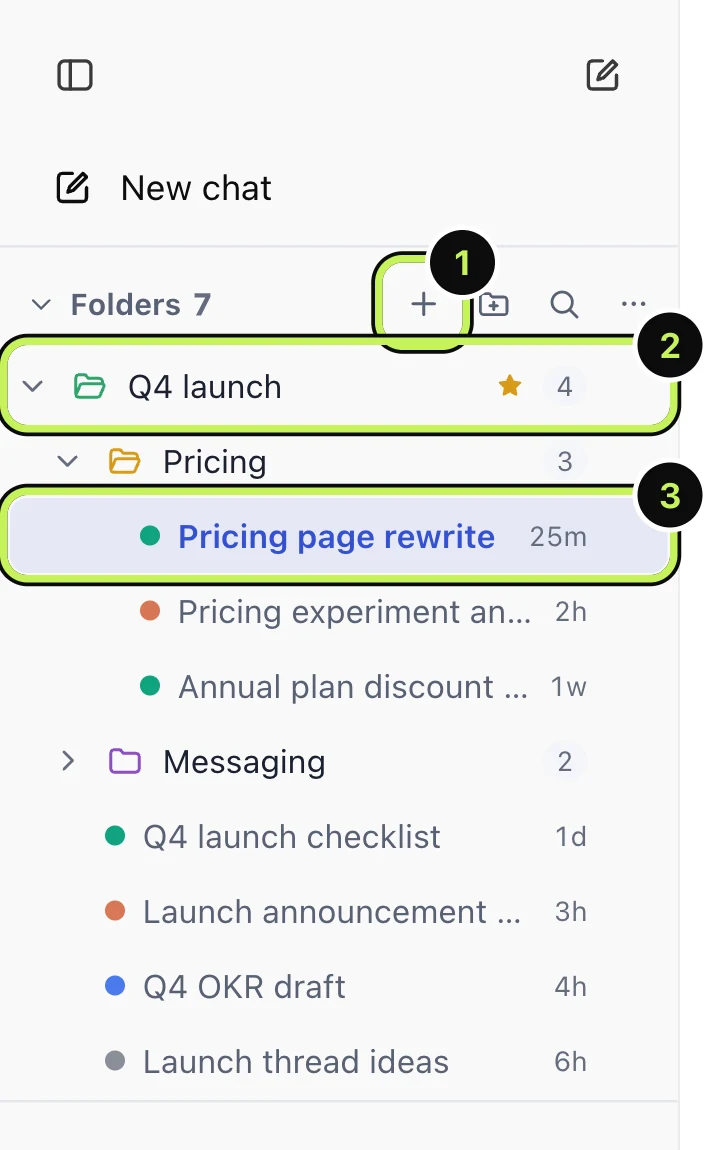
You can also file the open chat from the command palette (Cmd+Shift+K, then "Add this chat to a folder").
What can you do with a folder?
- Nest them. Put "Pricing" inside "Q4 launch". Folders can hold folders.
- Colour and star them. A colour makes a folder easy to spot; a star pins it up top.
- Drag to reorder. Drag chats and folders to where you want them.
- Filter. The small magnifier in the Folders header filters folders and chats by name.
- Collapse the whole section if you want the sidebar back to normal for a while.
The number next to each folder shows how many chats it holds.
What does the dashboard add?
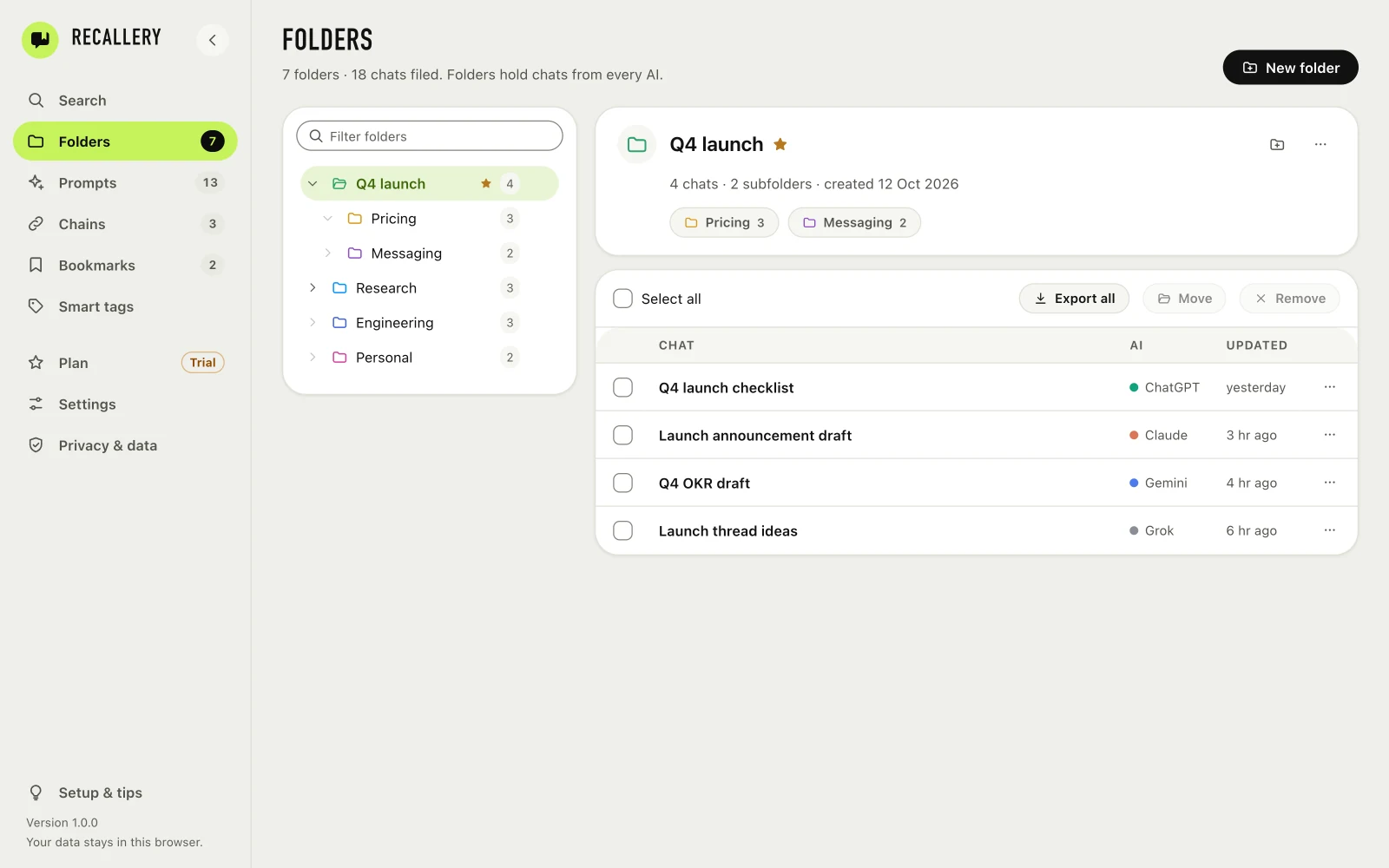
The Folders page on the Recallery dashboard shows the same tree with more room. Pick a folder and you get its chats in a table, with the AI each one is from and when it was last updated. You can select several and export them or move them to another folder.
How should you set your folders up?
The mistake is building a perfect tree on day one. Start with what you're doing now:
- One folder per project or client that you'll still care about next month.
- A "Reference" folder for answers you'll want again.
- Everything else stays loose. Search finds it later (see searching your chats).
You can always rename and move folders. The point is that the 10 chats you'll come back to are easy to find, not that the other 300 are filed.
What are the limits?
The free plan has 5 folders. That's enough for a handful of live projects. Pro removes the limit.
Questions people ask
Can I move a ChatGPT chat into a Project instead? Yes, if you use Projects. Recallery's folders don't replace them. Some people use both: Projects for shared instructions, folders for sorting.
What happens if I delete a chat on ChatGPT? It's gone there, and a link to it in a folder won't open anything. Remove it from the folder in Recallery.
Do folders sync between computers? No. They are stored in your browser. You can download a backup and restore it in another browser, see backing up your prompts and folders.