Long chats bury their best moments. Somewhere between message 12 and message 80 there was a paragraph you wanted to keep: the clean explanation, the working query, the wording that finally sounded right. Now you're scrolling up with your thumb on the trackpad, reading the first line of every reply.
Can you bookmark a message in ChatGPT?
Not that we've found. The tools ChatGPT gives you are for whole chats: rename, archive, delete, share. You can copy a single reply, but a copy lives wherever you paste it, and then you have to remember where that was.
Some people paste good answers into a notes app. That works, as long as you keep the habit. The trouble is the answer ends up cut off from the chat it came from, so you lose the question that led to it.
How do you bookmark a message with Recallery?
Recallery puts a bookmark button in the row of small buttons under each message on ChatGPT, Claude, Gemini and Grok.
- Hover over the message you want to keep. Click the bookmark icon next to copy and the thumbs.
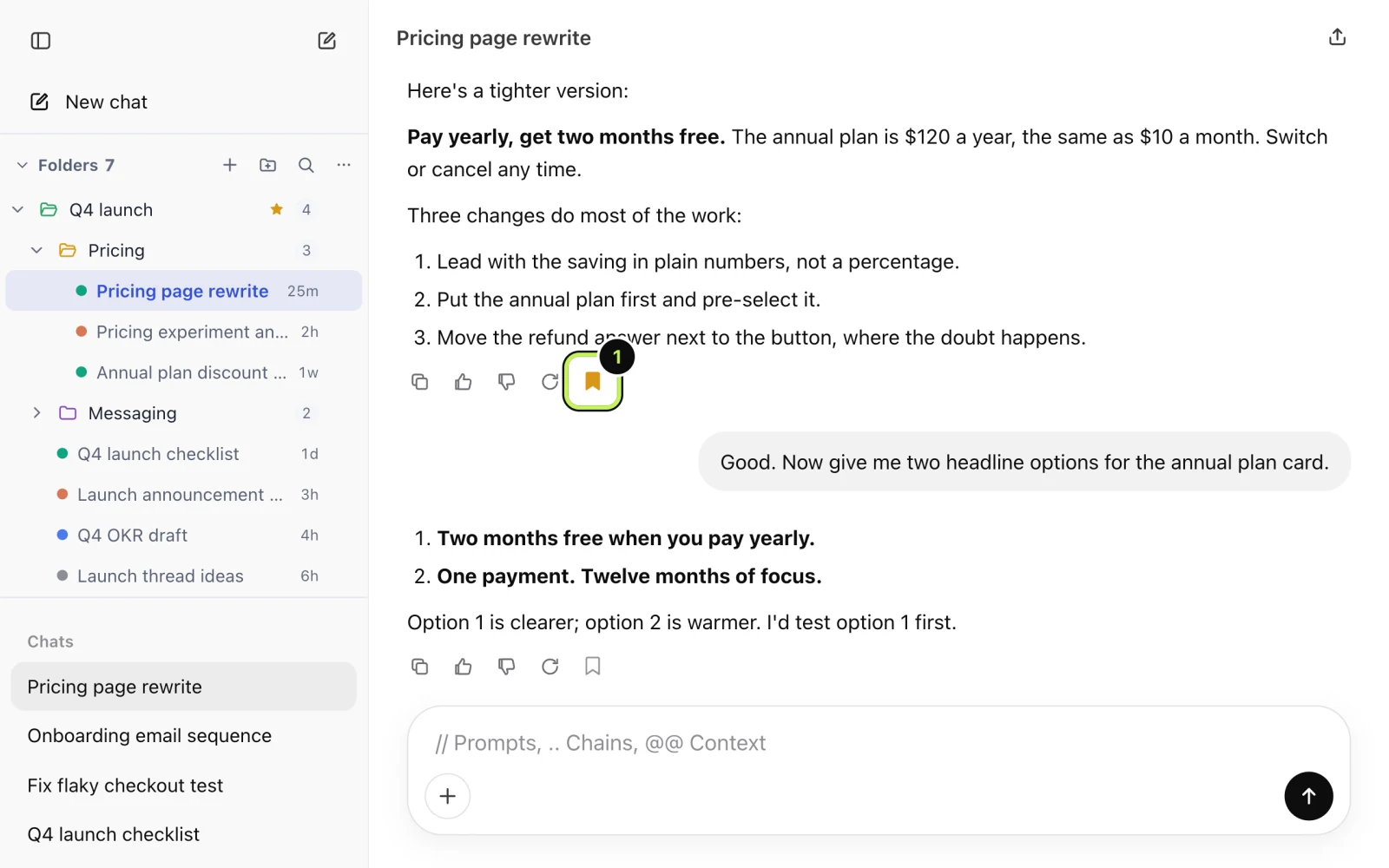
That's the whole thing. Bookmarks are stored in your browser, with a short preview of the message and a pointer to where it sits in the chat.
How do you find your bookmarks again?
Open the Recallery panel and pick the Bookmarks tab, or open the command palette (Cmd+Shift+K) and choose "Show bookmarks". Two sections come up:
- The top section, "In this chat", lists bookmarks from the conversation you're in.
- Below it, "Everywhere else" has the rest, from any chat on any of the four sites.
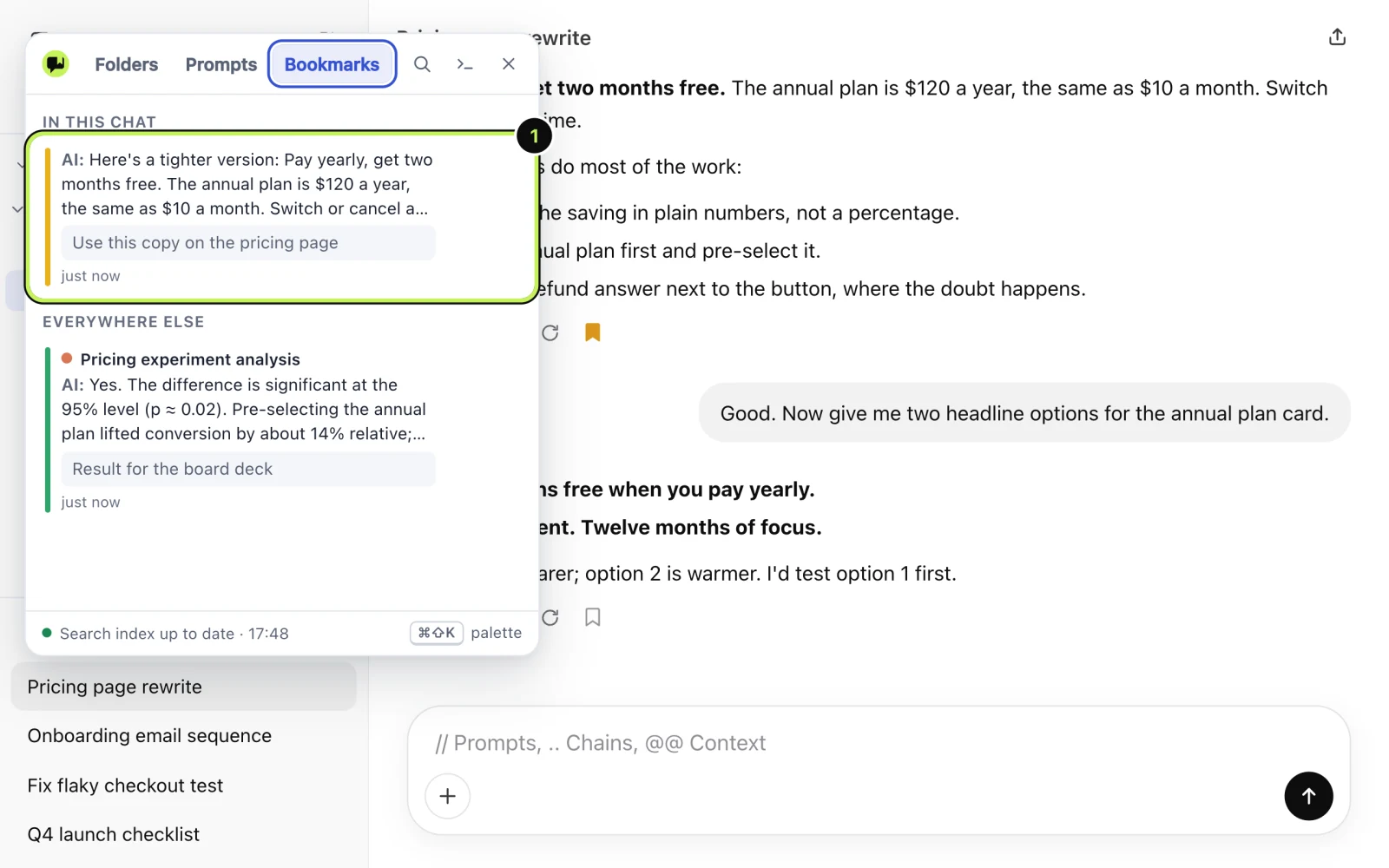
Click a card and it opens the chat and scrolls to the message. The menu on each card also has "Go to message".
Can you add a note or a colour?
Yes, both. The card's menu has "Add note", for a line like "use this copy on the pricing page", and a choice of colours. A note is the bit that makes a bookmark useful in a month, when the preview alone doesn't ring a bell.
Colours are for you. One way to use them: green for answers you'll reuse, red for things to double-check, blue for sources.
Can you search just your bookmarks?
Yes. In Recallery's search, is:bookmarked limits results to chats that have a bookmarked message. Combine it with a word, like pricing is:bookmarked, and you have a short list. There's more on operators in the search guide.
When should you use a bookmark and when a folder?
A folder keeps a whole chat. A bookmark keeps one message inside a chat. Use a folder when the whole conversation is the asset. Use a bookmark when 95% of the chat was getting there and one answer was the point.
What are the limits?
The free plan has 10 bookmarks. Pro removes the limit.
Questions people ask
Will the bookmark still work if the chat is renamed? It points at the chat itself, not the title, so renaming should be fine. If you delete the chat on the AI's site, the bookmark has nothing to open.
Do bookmarks sync across browsers? No. They are stored in your browser. Download a backup if you want to move them, see backing up your library.
Is a bookmark sent anywhere? No. It stays on your computer.